Prescriber Snapshot shows every prescriber their own prescribing, privately and on a regular schedule.

Prescriber Snapshot is a personalized prescribing reporting tool that regulators and public health agencies provide to prescribers. It turns dispense-level data into a private, regularly updated view of each prescriber's prescribing, organized by drug class, including opioids, benzodiazepines and antibiotics. Prescribers can compare their results against customizable peer groups and reflect on their own practice and prescribing patterns.
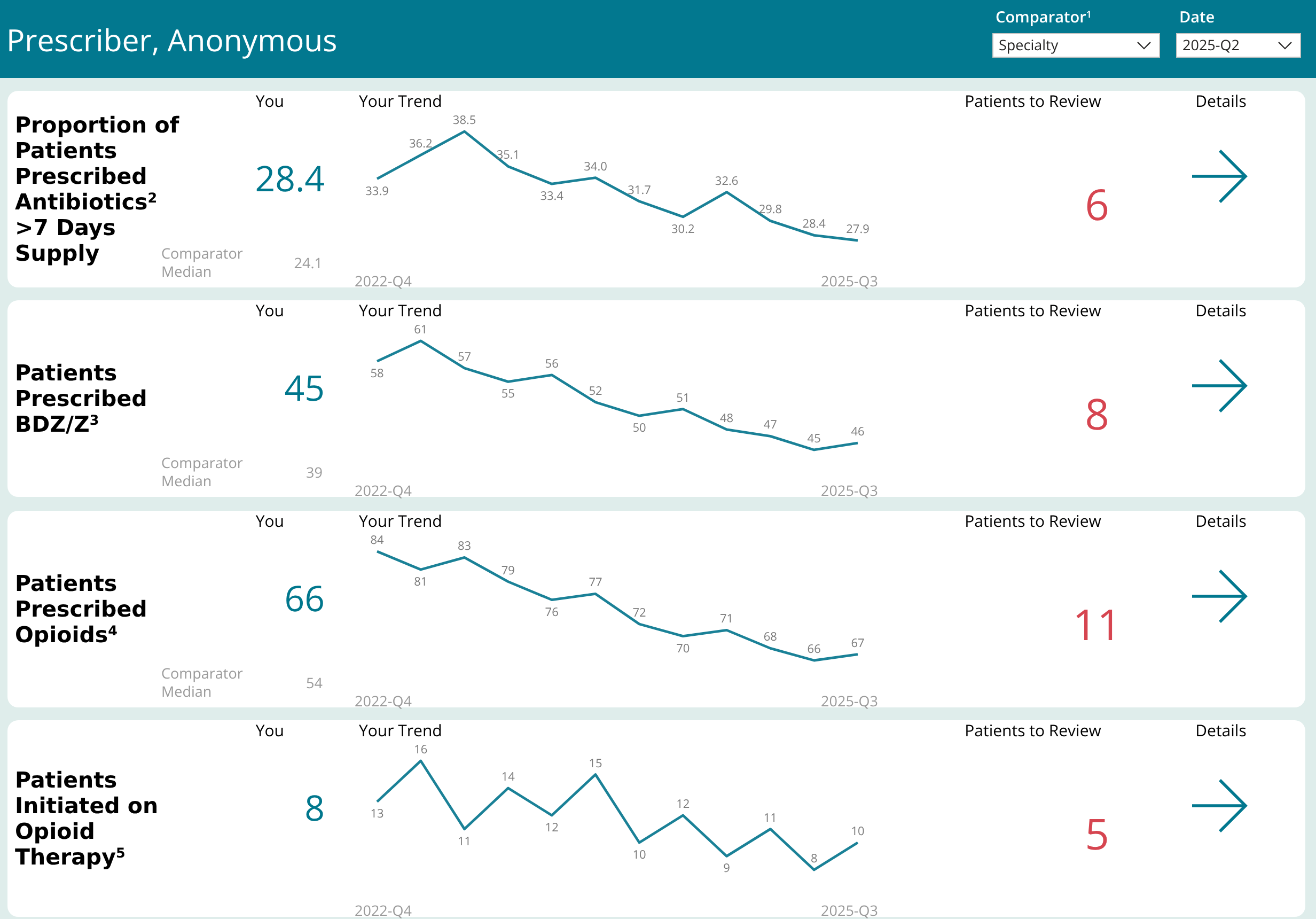
Prescriber Snapshot prescribing summary
Prescribing Summary: each measure with the prescriber's value, their trend, the comparator median and patients to review.

What it is

What is Prescriber Snapshot?

Prescriber Snapshot replaces static, hard-to-read, low-level reports with an interactive online report that prescribers can sign in to, where possible using an account they already have.

BeforeStatic, low-level reports
→
NowInteractive online report

It answers the questions a prescriber actually has:

01
Trends

How many of my patients are on opioids, benzodiazepines, antibiotics, and other drug classes, and how has that changed over time?

02
Risk

Which of my patients may be at higher risk: high daily doses, more than one prescriber, or an opioid and a benzodiazepine together?

03
New starts

How many patients am I starting on opioids, and on what type?

04
Peers

How does my prescribing compare with others in my specialty or peer comparison group?

05
Guidance

Where can I find guidance on the areas I want to work on?

Why Prescriber Snapshot Exists

Prescribers see one patient at a time. Their EMR shows what they prescribed, but not the pattern across their whole panel, and not what other prescribers gave the same patient. It is easy to underestimate how much you prescribe.

Prescriber Snapshot closes that gap.

It gives prescribers feedback that is personal, regular, and built for reflection rather than judgment.

The Four Problems It Was Built to Solve

01

The problem

Blind Spots

No single chart can show a prescriber's patterns across all of their patients.

The solution

A set of dashboards, organized by drug class, gives both high-level practice insights and detailed views, such as patients who may be at higher risk.

02

The problem

Hidden Risk

A patient receiving opioids from several prescribers, or an opioid alongside a benzodiazepine, doesn't stand out from inside one practice.

The solution

Patients who meet higher-risk criteria, such as more than one prescriber or an opioid with a benzodiazepine, are brought together in one patient list.

03

The problem

Stale Feedback

Printed reports usually arrive late and are out of date on arrival, which makes them hard to act on.

The solution

An online report refreshed on a regular schedule, with a trend line on every measure so change over time is visible.

04

The problem

Feedback That Feels Like a Verdict

Rankings and percentiles put prescribers on the defensive instead of prompting them to look at their practice.

The solution

The peer median appears as a reference point, not a rank, and each section links to guidance chosen by your program.

How Prescriber Snapshot Works

01

Ingest

Prescriber Snapshot works from dispense-level data in your jurisdiction's drug information system, combined with your registration data to place each prescriber in the right peer group. Reports are refreshed and published on a regular schedule.

02

Measure

Each prescriber's dispensing is summarized by drug class: patients treated, daily dose (OME/day), days' supply, short- and long-acting opioids, and patients newly starting therapy. Every measure carries a trend line, so change over time is visible, not just the latest report.

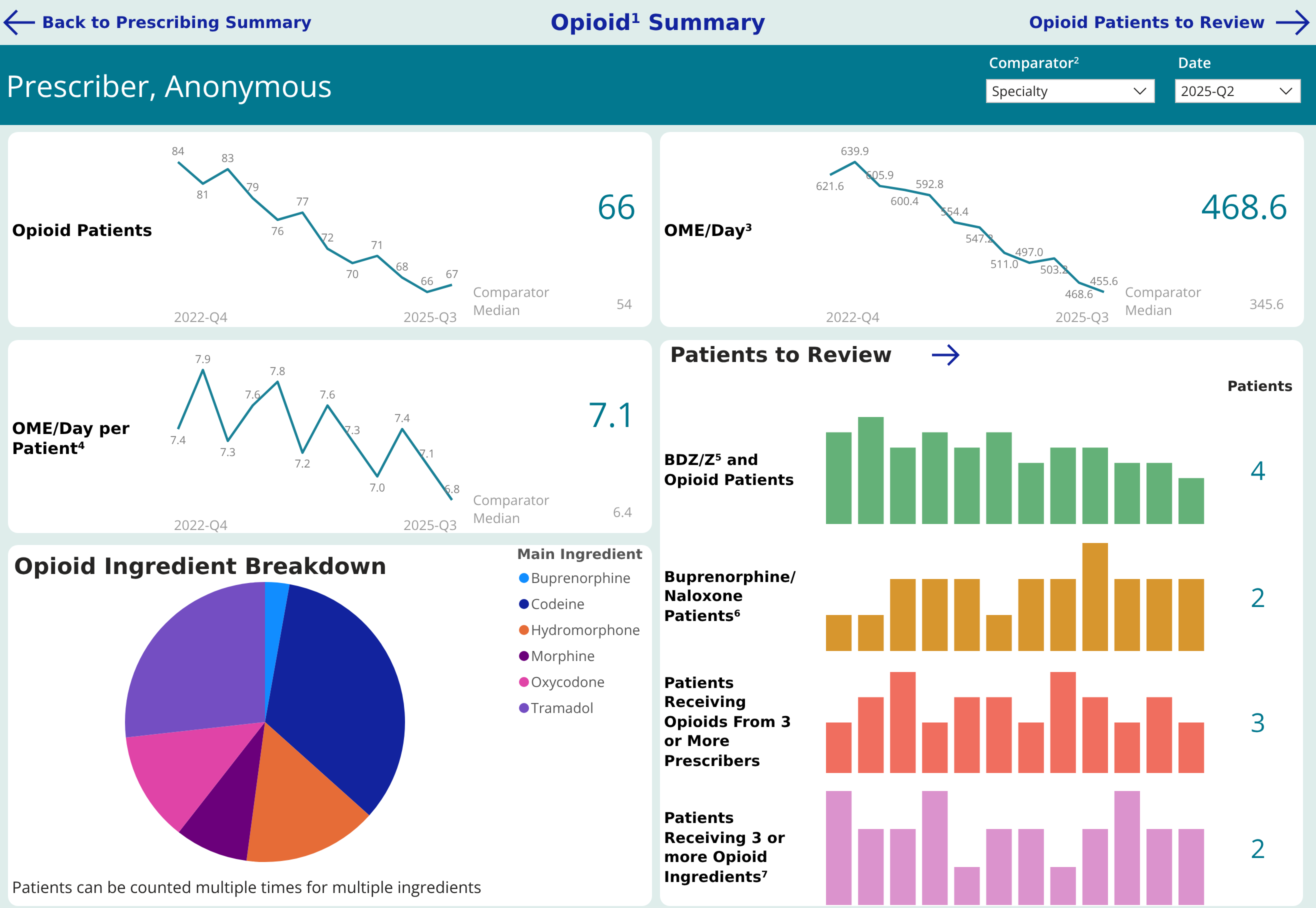
Prescriber Snapshot opioid summary
Opioid Summary: patients, daily dose and dose per patient over time, an ingredient breakdown, and patients to review by risk criterion.

Patients who meet higher-risk criteria, such as high daily doses, multiple prescribers, multiple ingredients, or concurrent opioid and benzodiazepine therapy, are brought together in one patient list, so a patient flagged on several measures is easy to spot.

Prescriber Snapshot patients to review list
Opioid Patients to Review: each patient's flags in one row. Names and identifiers shown are fictional.
03

Compare

Prescribers are compared with a peer group, such as their specialty or primary care network, and peer groups can be customized for your program. The peer median appears as a reference point for prescribers to reflect on their individual patient panels, rather than a rank.

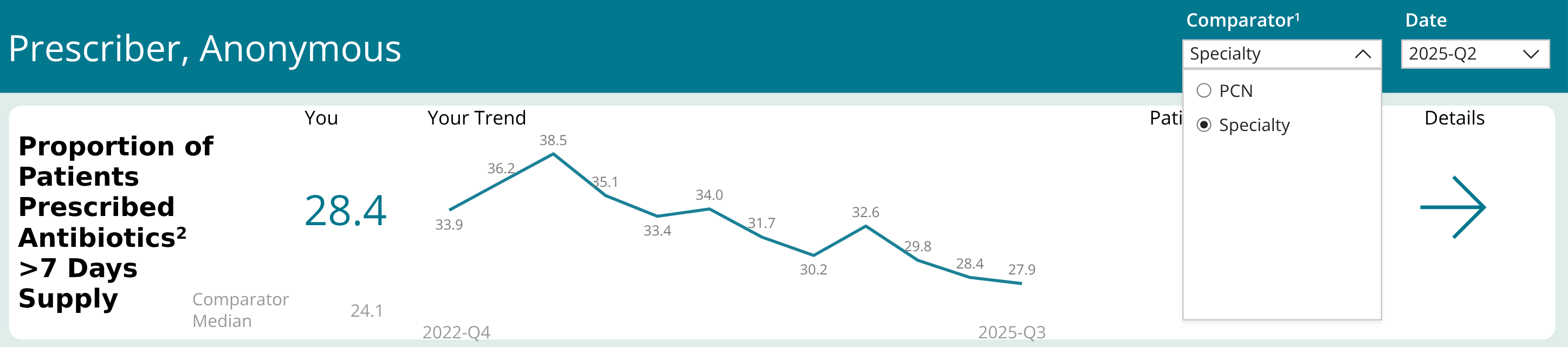
Prescriber Snapshot comparator selection
The comparator can be switched between peer groups, here specialty or primary care network (PCN).
04

Deliver

The report is delivered through a secure online portal. Prescribers sign in, land on a summary page, and go straight to their trends and patient lists. Each prescriber sees only their own data.

05

Reflect

Guidance sits on the dashboards themselves, such as recommended antibiotic durations next to the prescriber's own results, so it's in front of prescribers when they reflect. The report can also serve as objective evidence for continuing education and quality improvement activities. A Snapshot usage report is included so your program team can review engagement.

Prescriber Snapshot antibiotic review with evidence-informed durations
Antibiotic Review: the prescriber's result in context, with evidence-informed durations for common diagnoses right on the dashboard.

Configured for Your Program

Dashboards are configured for each program, around its prescribers and the priorities it wants to focus on. Every program builds on the same proven foundation, so tested views can be reused and new ones added as priorities change.

Current Coverage

Opioids

Daily dose (OME/day), days' supply, short- and long-acting use, multiple prescribers and multiple ingredients.

Patients Initiating Opioid Therapy

New starts, including patients started on a long-acting opioid.

Benzodiazepines and Z-Drugs

Patients 65 and older, concurrent opioid therapy, multiple prescribers.

Antibiotics

Prescriptions per day and per patient, stewardship category mix, and fluoroquinolone use.

Companion Reports

Other reports can sit alongside Prescriber Snapshot in the same portal. The current deployment includes an annual Practice Checkup focused on registration data.

Peer groups are defined once and apply across every drug class, so adding a new section doesn't mean rebuilding the comparison model. The same report works for any prescriber group and has been produced for both physicians and nurse practitioners.

Security and Trust

Only Your Own Data

Each prescriber sees only their own data, enforced at the data layer, behind a secure sign-in.

Encrypted and Protected

Encryption in transit (TLS 1.2 or higher) and at rest, behind firewalls and DDoS protection.

Logged for Audit

Sign-ins and report activity are logged for audit and usage reporting.

Data Residency

Data residency in the region your privacy legislation requires.

Development, demos and training use a synthetic dataset.

Frequently Asked Questions

Common questions about Prescriber Snapshot.

A personalized prescribing report, refreshed on a regular schedule. It shows each prescriber their prescribing over time, by drug class, alongside a customizable peer group.

Prescribers reviewing their own practice, and the regulator or agency program team that runs the report, chooses the resources, and tracks engagement. Regulators and public health teams can use Insights for a broader set of dashboards for their own internal use.

No. It is built for self-reflection. Peer comparisons give context, not a ranking or score card.

The prescription data your program already holds, such as from a prescription monitoring program or drug information system, plus registration data used to assign peer groups. Other data sources can be added as they become available.

Not necessarily. Where possible, Prescriber Snapshot uses an account prescribers already have with your organization.

No. Each prescriber sees their own patients and dispensing only; peers appear as a group median.

It can. In its current deployment, reviewing the report qualifies for Mainpro+ and Royal College MOC Section 3 credits, and it is accepted as the data source for practice-improvement activities. Eligibility is set by each accrediting body.

Learn More About Prescriber Snapshot

Give every prescriber a private, regularly refreshed view of their own prescribing, configured around your program's priorities.